I’m enjoying some seriously warm weather here in southern New Jersey! Here’s this week’s list of things to check out:
Easter Lights
I’ve gushed about Rhonda’s holiday-centric lighting appointments in my office here in past posts, and I’m excited by the newly installed Easter display. Spring!
Easter Lights in My “Office”
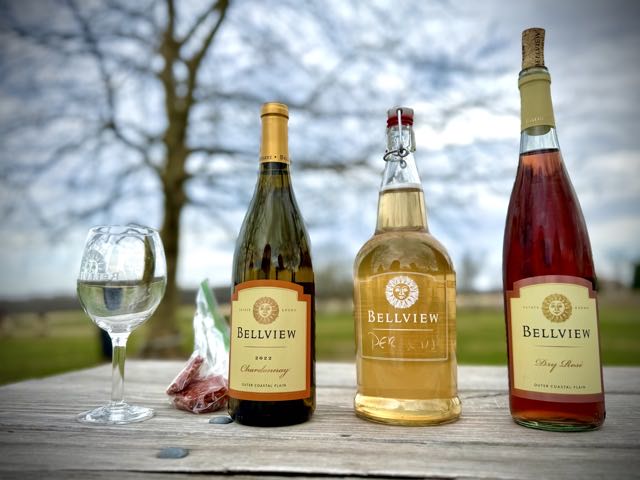
Bellview Chardonnay
Rhonda and I have been contentedly unable to extract ourselves from a love affair with Bellview Winery’s dry rosé. Last Saturday found me picking up some wine to bring home, as Rhonda was under the grip of a cold, and I grabbed a bottle of their chardonnay. It was great, and we resolved henceforth to add that into our rotation when we visit. Alas, Saturday’s visit did not in fact feature us drinking the varietal, but we did purchase a bottle for a near-future sushi outing.
The Perseus, I am happy to report, was excellent on a warm, if overcast, Saturday.
A Selection of Bellview WinesSure, there was the ABC movement and all that, but I can’t get sniffish about these things. It’s often the sturdiest white on the menu that will pair nicely with whatever we’ve elected to eat.
Old Shorts
After I rowed this afternoon (shorts, finally), I was keen to slip into a pair of shorts while I fetched the groceries and began the process of wrangling in mother nature’s reassertion of her primacy in our yard this spring. Living in an older home, we don’t have a ton of storage space, and having the upstair apartment vacated, it has turned into, among other things, a seasonal wardrobe rotation space.
Prior to dropping some weight, I had a pair of tan hiking shorts that bought back in maybe 1999 that, somehow, managed to survive year after year of oil changes, lawnmower blade changes, and half-baked plumbing repairs. Each year, I’d drag them out of the drawer, and wear them around the house for all manner of duty.
Those shorts are gone now, and last summer found me in possession of (needed) new sizes. Lacking the orientation of the good-ole-standbies, I didn’t really know which shorts I was even looking for. And the ones I extracted from the closet upstairs? They were nice. I needed grubbies.
Happily, Rhonda recalled that I had, in fact, fallen into the exact same pattern as before, wearing a pair of cut-off black denim shorts (which were once hers). I have to hitch them up with a belt, as they’re my size but I guess made to be loose. So I hitched them up and hit the road. Glad to have them back in my stable!
The act of writing itself helps us think, helps us learn, helps us discover how we feel about a topic. It’s creative and has value even if no one is reading. It’s a snapshot in time to look back on later.
I’ve wondered and pondered existentially here on more than one occasion. What is the role in our lives of pursuits outside of work? What is their priority? What does “work-life balance” even mean?
And then, in the Atlantic, Arthur Brooks writes:
Doing leisure well will generate the sort of growth in our well-being that work cannot provide. We need to take the time to dwell on life’s big questions without distraction, to learn to appreciate what is beautiful, to transcend our workaday lives and consider what is divine.
Leisure, in other words, is far from the modern notion of just chillin’. It is a serious business, and if you don’t do leisure well, you will never find life’s full meaning. Properly understood, leisure is the work you do for yourself as a person without an economic compulsion driving you. For Pieper, this work of leisure—no contradiction, in his view—would not involve such “acediac” activities as scrolling social media and chuckling at memes, getting drunk, or binge-streaming some show. Rather, true leisure would involve philosophical reflection, deep artistic experiences, learning new ideas or skills, spending time in nature, or deepening personal relationships.
In this conception, leisure done correctly is equally important, and a source of generation, rather than a solipsistic, selfish pursuit.
The fam snuck out for a Sunday early dinner at Phô Cali, which is one of several Vietnamese joints in Egg Harbor Township that we like, and we like Pho Cali the best. It’s been a really long while since we had phô.
I started my phô journey when I was working in Camden County, stopping off at a place in Berlin for my first sip. I used to dump all manner of sauces into the bowl, thinking that was the way to do it: it seemed like a suggestion. I had the presence of mind to ask once how to eat the meal, and the kindly owner said that I should do whatever I wanted to do. I don’t really sauce the broth anymore if it’s really good; it’s supposed to be the star of the show. But I will squeeze some on a bite of meat or put some chili sauce and plum sauce in little dipping bowls, if they offer them, and dredge parts of my meal through it. I do load the soup up with the crunchy sprouts and basil, though. I love the contrast.
Last night, we started off with spring rolls, bao buns with pork, and some summer rolls. It was great. Rhonda and I split a bottle of Josh Buttery Chardonnay.
Happy Sunday! Here’s this week’s list of things to check out:
Scratchpad
On the /macapps subreddit, Sindre Sorhus’s apps are often recommended for a variety of use cases, but also due to their high level of design quality. I recently read about Scratchpad on MacStories, and while it didn’t necessarily resonate as something I needed immediately, the gushy review gave me pause. I have, on many occasions, tried a simple text or markdown document on my desktop as a quick place to jot notes, a quick inbox for latter consideration. There is no shortage of solutions like this: Stickies, Drafts, Notes, and even your favorite text editor.
Scratchpad, like Tot, enforces some limitations that are likely for the good of parsimony: it’s one window, and one window only. It’s plain text. It runs on all of your Apple devices, though, so unlike something like Bike, which would be a great use case for such an outliner, you can open Scratchpad on any device and be right back where you were the last time you used it. It’s so simple that it threatens to be useless, but I suspect I’ll end up using it all the time.
Another note: Scratchpad is another inbox. In GTD, you should use as many inboxes as you need, but no more. I’m circumspect about adding any more, but again, I have flirted with this idea so often that I suspect I’ll get a lot out of Scratchpad.
Cool features include iCloud sync, translucency (toggle-able), and theme switching. I set the font to IBM Plex straight away.
Scratchpad by Sindre Sorhus
Apple Polishing Cloths
As with black input devices, Apple is known for comically high prices on items that raise eyebrows. Case in point: Apple’s polishing cloth. The notion of paying $20 for a polishing cloth is at once laughable and curious. I’ve always been pretty happy with the black microfiber ones they bundled with their kit for a while, and like to scrub my screens when I’m talking to someone in my office.
Woot recently had them up for sale for $6.99, so I bought three, almost entirely out of curiosity. They came yesterday, and I opened one for Rhonda and wiped her iMac screen with it, and then opened a second for myself, which I used on my 32” Samsung attached to my Mac Studio, and then my iPad.
I don’t think I’d pay $20 for one, but after using it, I’m more likely to pay that much than before. They have a structural rigidity to them that I didn’t expect, and a thickness that allows you to wipe without putting quite so much pressure on the screen.
Apple Polishing Cloths
Spring
March has always been a vexatious month, teasing with occasionally warmer temperatures of April and May, but mercurial in its expression, with cold, windy days preponderant. I dislike the extremes of summer and winter, and appreciate the moderate weather of spring and fall. Spring especially resonates in our collective unconscious, inspiring a feeling of hopeful rebirth and thawing of our wintered, cloistered selves.
I remember talking to my grandfather, late in his life, and he said, “I made it through another winter.” There is something about winter that calls for survival; it’s surely connected to our evolution as a species and culture. Our bodies remember that this was a time when survival was not a matter of sweaters, scarves, and one-pot dinners, but rather a time when things might get both scarce and hostile to our mortal, but no less clever, selves.
Whew: all of that to say that I’m excited Rhonda put up some Easter garland. I love the pastel colors.
In American Philosphy , philosopher and professor John Kaag, beset by personal circumstances, undertakes to catalog the neglected personal library of William Hocking. As he combs the stacks and chronicles the delights and challenges he faces, Kaag peppers his reflections with references to philosophy. It works well as a non-textbook-style review of the philosophy without coming across as a survey or critical examination, and explicates a larger point: the place for philosophy in daily life. It is, in structure, similar to his excellent Hiking with Nietzsche, trading the Nietzschean hikes in the Swiss Alps for climbs among the library’s stacks.
American Philosophy Book Cover
In American Philosophy, Hocking’s private library, still standing as a drafty, neglected museum of first editions and personally imprinted tomes, allows Kaag to leaf through pages and reconsider the cannon.
What’s appreciable about American Philosophy, as with _Hiking with Nietzsche,_is that neither books are attempts at defense or critique (although the latter shoots the occasional dart at Kant). In addition to Hocking’s work, he reviews the writing and thought of James, Emerson, and other luminaries of America’s contributions to philosophy, as well as Hocking’s own life.
As Kaag points out, American philosophy has never been included in the classical cannon of philosophy: “To this day, American philosophy is regarded as provincial and narrow in its focus, just another by-product of the nation’s political and cultural exceptionalism,” he writes.
Rather than a unifying system of thought, American philosophy, in Kaag’s analysis, reveals a cannon that leans heavily on its forebears, borrowing and hybridizing from both the Bible and European thinkers. American philosophy is connected, in its development, to other models of thought, including existentialism. It’s historically satisfying and unifying in showing American philosophy’s evolution from its European forebears.
Wonder and mystery feature heavily in the upshots of American philosophy; there’s an optimistic aura of wonder and mystery that distinguishes it from European philosophy. And while there is not a defense or refutation of American philosophy itself in Kaag’s book, he does offer this:
Philosophy, and the humanities more generally, once served as an effective cult of the dead—documenting, explaining, and revitalizing the meaning and value of human pursuits. It tried to figure out how to preserve what is noble and most worthy about us. At its best, philosophy tried to explain why our lives, so fragile and ephemeral, might have lasting significance.
As a younger man in college growing distant from my religious upbringing, I found in philosophy a kind of replacement: in Nietzsche, the call to forge one’s own values and ideals, and bringing meaning to one’s own life in the absence of one anointed truth. So, too, in writing: polishing my verbal effluvia into structured writing could be, in its own way, a thing that lives beyond me. That continues in me to this day, and is easily relatable to becoming a leader: lacking external direction is a reliable feature of adulthood, and the capacity to generate priorities and values is paramount .
Too, it connects to this post here on Uncorrected, a quick one-off pull quote with a comment, on why anyone undertakes the task of writing and publishing: in the absence of waiting for Godot, instead of waiting for the promises of an afterlife, American philosophy approaches human existence as a mystery:
Gabriel Marcel’s comment that “life is not a problem to be solved but a mystery to be experienced…
More importantly, it reveals an important feature of philosophy (and, I might add, the arts themselves, and perhaps our entire generative proclivity as a species, echoing Erik Erikson’s description of self-actualizing whereby we evolve, if we’re lucky enough, to generativity):
Philosophy, and the humanities more generally, once served as an effective cult of the dead—documenting, explaining, and revitalizing the meaning and value of human pursuits. It tried to figure out how to preserve what is noble and most worthy about us. At its best, philosophy tried to explain why our lives, so fragile and ephemeral, might have lasting significance.
We often quietly toil in some way unique to ourselves: behind a keyboard, in an office, repairing things, whatever. Our hope is that our efforts spread beyond our own narrow interests, and, in their way, supplant our quiet, desperate hope for an idyllic afterlife with something less fantastical, but no less immortal.
I haven’t had much to say about rowing here, but that’s not because I haven’t been. In addition to often logging meters seven days a week (with the occasional day off), I’ve been doing steady state most days (intervals twice a week minimum, but no more than three), but mostly in zone two. Zone two is the new hotness.
Here are a couple of screen grabs from Concept2’s Log Book. First, a 1K from January of 2024:
Rowing Log Book January 2024
So a 2:02 pace, not fast for that low a shorter piece, but emblematic of my longer steady state efforts from that era (including my best-ever 2:02 10K. And the stroke rate: 30 rpm.
Next is a more recent 1K piece, at a slower 2:04 pace, but only 25 rpm:
1K Log Book Entry from 2025
So that’s what I’ve been after: base meters at a more comfortable pace, but pushing harder on the work side.
One thing I did notice peripheral to the holiday was that I was getting some crappy sleep. I was going to sleep later, and waking up earlier. Bad combo.
I can’t say it’s 100%, but I blame my in-bed use of the iPad Mini. I was getting back into using RSS and Safari’s Reading List, looking at old additions to my list and recategorizing my feeds.
Reading in this way, on such a device, is for me a far more active activity than reading a book or article. There’s a fair bit of bouncing around and looking at Notes and starting drafts when the muse hits.
Reading on an E Ink screen, save for some highlighting and notetaking (I only highlight), is much more traditional, linear reading experience. Sure, you can fall prey to endless library of books and previews available to you, but it’s easy to just fall into your book for a while. I start to get groggy when I’m reading on my Kobo after a bit, and it’s evident when it’s time to hit the hay. I’ve dropped it on my face a time or two.
Kobo
So I pledged to myself to only read E Ink screens in bed. After Readwise each night, i’d switch over to the Kobo. I also pushed the time I assemble the dogs for their final walk, clean up for bed, and make sure everything is in its right place down to 930 pm.
I find reading makes me tired, and not switching contexts between apps and taking notes and more is more relaxing (if boring) compared to reading on the iPad mini.
I’ve been able to track my sleep using my Apple Watch since upgrading to the 7, but I never used it for that purpose because I always needed to charge it by bedtime, and that made the most sense to me.
Upgrading this past November (my birthday) to an Apple Watch X, I was able to benefit from longer battery life, yes, but also swapping watches when the juice in one gets low. Especially since the whole Masimo thing, it’s nice to be able to still measure my blood oxygen. So long story short: I have plenty of runway to track my sleep now.
Apple Health is fairly neutral on the subject of your sleep quality. It reports your total sleep time, and separates your sleep into Core, Deep, REM, and Awake categories.
Apple Health Sleep Info
Apps like Sleep+ and the Withings app offer more qualitative assessments of your sleep. Neither like my not-quite-seven hours of nightly sleep. And they both report that my sleep isn’t restorative, because there’s not enough REM or Deep.
Sleep Data in Sleep+ for a Standard Week Night
I figured that’s probably due to the length of my sleep. If I slept longer, I’d get more REM and Deep, right?
Not so fast.
Sleep+ Showing Last Night’s Sleep
Friday into Saturday often yields more sack time, as does Saturday into Sunday. You might expect the 11 hours total I got last night would have yielded some extra REMs. But that’s not the case.
There are a few hypotheses you could generate to explain this. First, it’s possible that your REM and Deep sleep depend on your average nightly rest, not single sessions. That wouldn’t surprise me. It’s also possible there’s something I could be doing differently to influence those numbers. There’s always the possibility that you can’t do much about your sleep phases, which one of the apps even mentions.
Rhonda ordered AppyHour’s “Taste of Ireland” limited release box after some hesitation (ie the price) to celebrate Monday. I don’t generally equate Ireland with anything besides cheddar cheese, and that is here in spades, with a very nice two-year aged variety. But the Cashel Bleu is outstanding. I really like the mustard they included too.
AppyHour’s Taste of Ireland BoxAppyHour’s Taste of Ireland Cashel Bleu
Sharrott Winery’s Spicy Pepperoni Flatbread
Sharrott Winery is the perfect spot for a quiet chat with someone you love, over a bottle of their rosé, and something to chew on. The spicy pepperoni flatbread is a nice, chewy dough topped with natural casing pepperoni. It could stand a turn in a hotter oven, but it’s still a great dish.
Sharrot Winery’s Spicy Pepperoni Flatbread
Bellview Winery’s Fiona
Fiona does not appeal to me visually, and hearing the taste profile made me pretty sure I’d dislike it, but the latter was not the case. Like Bellview’s Sunrise wine, it’s “off-dry” or “semi-sweet,” interchangeable descriptors that are best used depending upon who you’re trying to sell to, I suppose. But it has enough acid and sturdiness for this oenophile.
I just scratched “waiting for wordland” off of my OmniFocus list. Dave Winer created this super-fast, dead-simple posting tool for WordPress. You can write a proper post, but you can post Mastodon-length toots too. It’s so fast and simple.
I was excited last night to learn that there’s a Feedbin Connector for Iconfactory’s Tapestry. I was circumspect about installing it, because in some ways I look at Tapestry as different from my canonical RSS consumption, but I put a lot into winnowing down my news feed and often wonder what it would be like to have everything in Tapestry. I imported all of my feeds into the new Reader but it didn’t stick for me as a replacement for other readers (usually ReadKit these days). I also like the fact that if I decide I don’t want to use Tapestry for reading my RSS feeds, I can just disconnect the connector.