In the vein of “sometimes the goal is not to have a goal,” I did not start “season two” of my rowing obsession/practice with the intention of beating my meterage from 2023-24. If anything, I would have gracefully allowed myself to have lost some distance, considering a started a job with an earlier start time, longer commute, and longer overall hours.
But I noticed fairly close to the end of my second season that I was close to hitting the same distance I logged in 2023-24, and was happy about that. By looking at my daily average, I knew I’d meet-and exceed-last Year’s distance.
Seasons One and Two using the PM5
Hooray for all that.
That’s 20 to 30 minutes a day, most days of the week.
Here’s a fun screenshot: the notoriously inaccurate calorie meter in the PM5 reports that as of today, I burned 238,821 calories rowing. Roughly speaking, that’s 68 pounds. I lost more than that but that’s pretty close.
Rhonda is delightfully attentive to our local Shop Rite’s sales on beef rib roasts. They reliably put these on sale peripheral to holidays. She got this one for around 40 bucks.
I always cook them the same way: about six hours in the sous vide at 130, then a sear on the charcoal grill (lump usually, but I’m catholic about it). I rubbed this one with a prepared mix Aaron brought home from a local business.
Rib roast sealed up
It probably took about 20 minutes on the grill.
Rib roast on the grill
I never remember to take a pic once I get inside. I let this rest for at least ten minutes and it was still nice and warm. And pink.
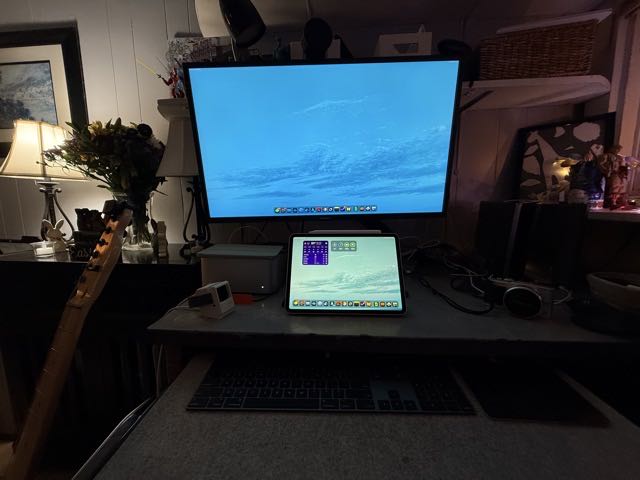
I wanted to get all of the peripherals that I could share using the OWC Dock set up over spring break, so I worked on that today. I plugged my Focusrite Scarlet Solo and Razer webcam into the dock, and moved the Samsung T5 drive I split between Time Machine backups, and Steam, Epic, and Blizzard game libraries closer towards the center of the port array on the Mac Studio. This will make plugging the Thunderbolt cable into the Studio much easier than threading between other peripherals’ plugs.
I haven’t tried plugging another device in the dock yet, but at least it’s set up. I’ve been using my iPhone as my web cam at work using continuity camera, and don’t do many meetings from home such that I’ve needed the camera. But the Razer Kiyo Pro really looks nice, I have to say.
HDMI vs DisplayPort 1.2
I was rearranging cables to make all of this magic happen and I saw a nice thick braided cable snaking up from the side of the desk. I followed it to a DisplayPort plug, which I’ve been using for Aaron’s old Alienware from my Windows phase. I remember reading before that DisplayPort may be favorable to HDMI before when messing with the KVM switch, so I asked ChatGPT about it. Since my Samsung U32J59x supports DisplayPort v 1.2, ChatGPT thought it might be beneficial, too. So I unplugged HDMI from the display and replaced the cable with the DisplayPort cable. And that worked just ducky.
Display sleep Issue
The switch from HDMI to DisplayPort resurrected the ghost of a familiar bug: the Mac doesn’t sleep the Samsung after a period of inactivity when it’s connected via DisplayPort (or the other way around), but things work as expected over HDMI.
ChatGPT informed me that this was a known issue. The current workaround is a Launchbar action that fires a simple script: pmset displaysleepnow, which is self explanatory. It’s an extra step for me and I’d have to know that I’m not coming back to my desk for a while (which doesn’t always happen… you get pulled away).
Scripting
I asked ChatGPT about possibly scripting something to check if I was using the Mac, and after a certain interval of the computer being idle, run pmset. So maybe I’ll fart with that next.
Loneliness is the fundamental condition of life — we are born by another, but born alone; die around others (if we are lucky and loved), but die alone; we spend our lives islanded in our one and only human experience — in these particular bodies and minds and circumstances drawn from the cosmic lottery — amid the immense ocean of time and chance teeming with all possible experience.
It’s great to have a place to share your thoughts. A place you can go back to when you want to remember something you had written or thought about before. A place you can refer people to when they have questions you’ve answered in the past. A place to be you. So, get a blog, and put all the things there.
After Monday’s quick (read:impulsive) setup of my OWC dock, I was briefly possessed by an idea that would allow me to send the dock back to Amazon for a refund, and that made me smack my forehead due to what I perceived as an oversight.
Having set up the dock with my desktop Mac first, I tried plugging my older M1 iPad Pro into it. It worked great, and I was excited to get this rig up and running, buoyed by the successful first run.
iPad connected to the OWC thunderbolt dock
I plugged my MacBook Air into it next, which also worked well… mind you, I had the keyboard and trackpad plugged in via USB (lightning and USB-C, respectively, on the device end). I didn’t bother unpairing the peripherals from the Mac Studio, because I knew that the cabled interface would take priority. But at some point, I realized that, after I disconnected the cables, the keyboard and trackpad were still working … with the laptop.
That was the forehead-smack moment. I did in fact know that this worked; I have an iMac in my office from the previous occupant, and at some point it suggested that it could share its keyboard and mouse with my laptop or iPad (I can’t remember which). But it worked, and it was, at the time, to my mind, a good example of what makes Apple’s ecosystem interesting.
The feature is called Universal Control and it works pretty great. And I thought for a moment: I don’t need a dock. I just need the HDMI-to-USB C Anker cable I ordered with the dock. I could just as easily plug and unplug the display, and use the peripherals wirelessly. I don’t like the cables coming out of the backs of the devices anyway.
But then I tried to log into my Mac Studio; I plugged the dock into the Mac and the display lit up with macOS’s login panel, but neither the keyboard nor trackpad were recognized. And I realized that the feature works great–when you’re logged into two devices with the same iCloud account. But the Studio had logged me out.
And I also realized that the benefit of the Thunderbolt cable that connects the dock and the Macs/iPad provides power to the iPad, which is always a challenge with using it as a docked device: there’s one and only one port. So anything that involves a monitor and a lengthy sit on your ass in front of it will also need power. So you need a hub of some kind, and Thunderbolt fits that bill nicely (cheaper powered hubs are, of course, available).
So that’s a lengthy summary of days one and two with the dock; I’m looking forward to having next week off work so I can fart around with it a bit more.
iPad M1 connected to OWC dock
I think a preview of future posts will involve the iPad: it was really nice running it on a 32” 4k display with a keyboard and trackpad. I was doing this the other day at work and I really was digging it. I do hit a productivity wall the with the iPad, though, and when it’s time for a computer, it’s time for a computer.
One of the features I was missing in a Mac OS utility was the ability to trigger commands without mousing, but still interacting via the GUI. The utility I used to rely on for this was MaxMenus by Proteron software, which is no longer (I see that I purchased it in October of 2002 for about thirty bucks).
I would create menus/palettes with commands to common actions, and I’d trigger the menu to pop up with a keystroke or mouse click (I can’t remember… It might have been hot corners).
When I first tried Pieoneer, it was in the spirit of replacing Max Menus. I used it solely as an app switcher, which is not this app’s marquee feature. If you only have a few apps running at any given time, you might be able to live with Pieoneer as your app switcher. But it’s not better than the default macOS app switcher. Or Launchbar, for that matter. It is cool if you prefer moused-based navigation, though.
There is an app-specific mode, however, called Controller, wherein you can assign commands to a radial menu that is specific to the active app (the one you’re using). The defaults include Safari and Finder, and they’re both examples of how you can use Pieoneer to great effect. In Safari, you can open up the sidebar, tab overview, and more. It’s great for exposing features in the application for which you often forget the keyboard shortcut.
I do think that my long-standing setup, which generally features Launchbar to do almost everything, is muscle memory and I’m not going to stop using it. Launchbar launches apps, starts web searches, organizes files, and navigates just about everywhere. It’s a piece of infrastructure that I absolutely rely on. It’s simple to start using but has true depth.
Maybe Pieoneer is a mouse-driven version of Launchbar?
Logitech MX Master
One of the features of Logitech’s excellent MX Master mice is the LogiOptions software, which I was loathe to install but find useful in setting up custom commands for the mouse. One of my favorite buttons on the mouse is the thumb button, which was programmed by default to show Mission Control on the Mac. I like Mission Control to some degree, but I often find the tiles to be too small to be useful when I’m running a bunch of apps (which I usually am).
I set up Pieoneer to show the Launcher feature when I shift-click the thumb button, and to show the application-specific controller menu when I click the thumb button without a modifier key.
Here’s this week’s list of things to check out. It’s been a long extended winter, and I hope everyone is seeing the promise of greener days ahead. This weekend has certainly not been an indicator of green things to come.
Cambozola Brie with Bleu
Aaron and I stopped at Bagliani’s on the way home from his Rutgers visit last Saturday, and in addition to a big salami (the cashier described it unfavorably as “extra slimy”), we got his favorite cheese, an asiago with black pepper, and this camembert-ish bleu cheese. I like a little stank on my cheese. We’re having spritzes and cheese as I type this.
Cambozola Cheese
Bellview Winery’s Hyacinth
Rhonda and I alighted for Bellview Winery today, having reservations about getting a good seat and decent service because of a spring fling event. (I can’t begrudge the business for participating in revenue-driving activities, but they’re a drag for us regulars.) Because of the weather, ti wasn’t crowded, but we were not able to avail ourselves of anting more tasty than some janky buffalo chicken tater tots. We prefer wine and salami with our wine to teenager food. Ahem.
Anyway, we got a bottle of rosé and a growler fill of their Hyacinth. It’s a dry white, less sweet than the Perseus, but lots of pear and melon.
Bellview Winery’s Hyacinth Dry White
MacBook Air M4
The MacBook Air has been a good choice for anyone needing a Mac for regular productivity for over a decade now. It’s the default for most needs. This one I’m rocking has 512 GB internal storage and, of course, 16 GB RAM. It does it all. This pic is a good example of the Midnight color in bare light.
MacBook Air M4
There’s probably not much to say about the M4 that’s interesting here, but I’ll endeavor to in the future. Having experimented with a KVM switch so that I could run Aaron’s old Alienware PC for a while and switch between it and my Mac Studio, I realized that the M4 Air would be a fine machine for me for all of my needs. To that end, I ordered a dock to keep here at home so that I can dock whatever machine, iPad included, and use it with my Magic Trackpad and keyboard.
I was listening to a recent episode of the Mindpump podcast, and the hosts were interviewing a caller. She was talking about being in great shape but feeling like she needed a new goal. The answer surprised me: you don’t always have to have goals.
They weren’t saying goals are bad, or counter-productive, or anything like that. To the contrary, they lauded her progress and hard work. But, the suggestion was… at some point, you just have to stop and enjoy it.
Host Adam Schafer started off by asking why she felt like she needed to see a nutritionist. What led to the nutritionist and setting goals? She responded that she liked the little challenges, and cited some examples. She likes something to “shoot for.”
Schafer advised, “I’m going to say something you’re probably not going to like…I’d go in the opposite direction… I can tell you’re already good… you’re fit and healthy… if everything has to be attached to something you’re chasing…. Can you just enjoy the process? You’re the client I’d push back on.”
“Can you start to intuitively eat and intuitively train?”
Here’s this week’s list of things to check out. It was kinda crazy weather in southern New Jersey last week: warm and humid for a couple of days, windy and cold others. Spring comes in fits and starts.
Rutgers University
Aaron has professed an interest in working in a professional kitchen since he was a child. He wanted to be a pizza chef for the longest time, and this directed him to applying to our local county technical high school for their culinary program. After four years of cooking in school for a significant portion of the day, and a couple of college tours, he’s thinking food science might be a better direction.
I remember Joey’s teachers in preschool (preschool!) professing concern that Joey, when asked, didn’t know what he wanted to do with his life. It had been many years between my graduation from college in 1997 and not knowing the answer to that question myself, but I remembered the feeling well.
One of the inherent inflexibilities in the county vocational school experience at Aaron’s school is that you can’t switch programs if you change your mind. This is not generally a restriction that one will encounter in “real life.” But it ultimately doesn’t matter. If you went to high school and took welding, auto shop, computer programming, or culinary arts classes, and learned from that that your chosen path might consequently veer to the right or left, you learned something valuable that many other people don’t get a chance to. If you learned how to fix cars in high school but became a lawyer professionally, then you possess a skill that is likely beneficial–and rare in your circle.
Anyway, we went on a campus-specific tour for accepted students Saturday, and it was a blast to stomp around the Douglass/Cook Campus and see the animals, classrooms, and more. Rutgers University Rutgers University Swine
Rutgers-Adjacent Hot Pot
Aaron and I hit the Happy Lamb for hot pot following his Rutgers tour yesterday. We intended to try a soup dumpling joint in the same plaza, but it was packed. This was a familiar experience to our Delaware adventure, but we both agreed this place was a notch above. Happy Lamb Hot Pot
Remember your first Mac? Mine was a Color Classic 2 running System 6. I had a succession of Mac after that and experienced every release from that Mac to Sequoia.
Infinite Mac lets you boot and play around in the Mac operating system of your choice, and even includes a couple of NeXT releases.
I am thoroughly happy with the state of macOS these days, but I have an unbridled affection for the old days, too (including Mac OS X 10.3 Panther and 10.6 Snow Leopard). The Mac has always been a fun platform to just play around on. And in the days before persistent internet connections, it was very much so. I could go on, but I miss the tear off Application Palette in Mac OS 9, Themes, and Window Tab. Lots of fun at this cool project.
The Finder sidebar on my Mac Studio has long shown a laggy to throttled iCloud sync icon, suggesting that something was not syncing correctly. I do use iCloud to sync documents (and photos) between my devices, but I don’t notice any such behavior on any other devices, and in terms of being able to find what I’m looking for, I always can. So new files sync fine, and changes to documents sync fine, too. I even leave some OmniOutliner documents open on multiple computers and I’ve never run into an issue.
I checked with ChatGPT about this after seeing if possibly it was network related (it’s not, as far as I can tell). I eventually asked it for some terminal commands to help me diagnose the problem, and it suggested tryin the bctrl command. Which I did.
After trying ChatGPT’s first suggestion, I read the usage output and went with just brctl status. This revealed a list of files:
brctl output
I went into the Finder and found each offending file and deleted them (they would then materialize in the same directory). It must have been one particular file that was causing the issue, because after deleting it, the output from brctl was clean. Well, almost.
There were “unclean items” being reported as well, and the progress wheel in the Finder was still stuck. The brctl output was less verbose about the location of these files, but it did share truncated file name information. I used Finder Search to figure out which files were the culprit. So I ditched those files and whoosh no more stuck progress wheel.